

In this article, I will show you how to integrate the refresh token mechanism to the ASP.NET Zero project.
We use Angular HttpInterceptor to handle requests. And I will implement how to use refresh tokens using Interceptor.
As a summary, the HttpInterceptor works as a middleware between each requests and server. As a default, all your requests enter the HttpInterceptor’s intercept method. And then you can handle the request and release it to the next handler. Our interceptor will work as shown in the below diagram.
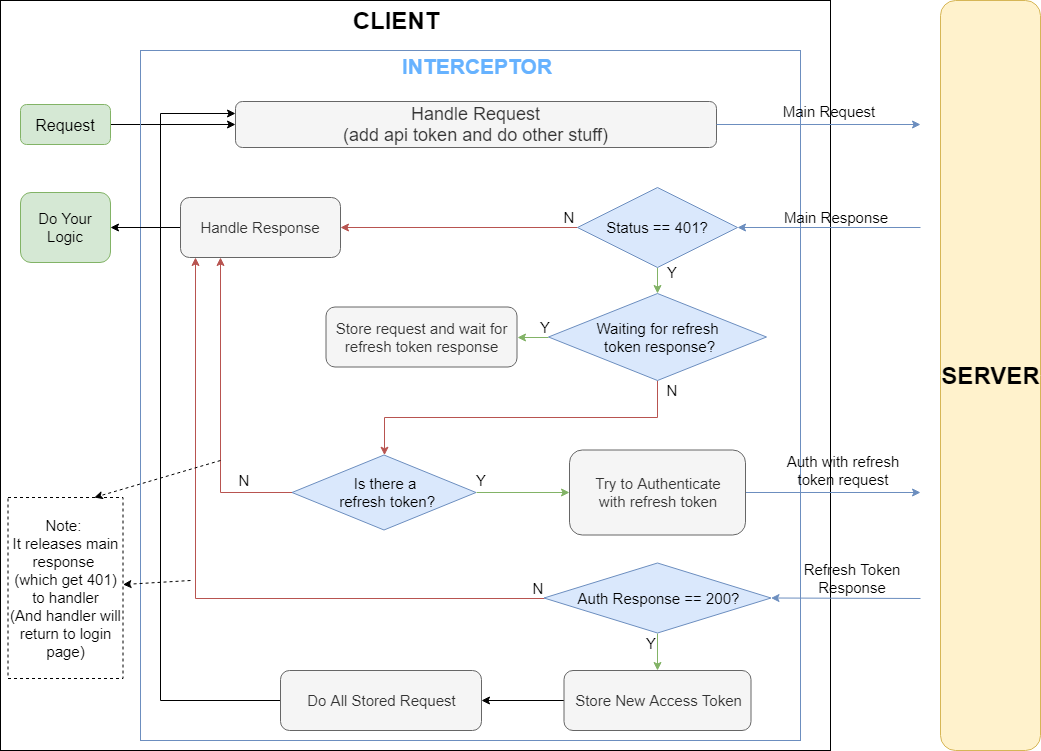
Before each request:
- Handle request(add auth header etc.) and call server with that request. And subscribe to result.
After getting a response:
- Check if it is a HTTP 401(unauthorized) result
- If it is not, pass it to next handler
- If it is HTTP 401:
- Check whether if there is an ongoing reauthentication with the refresh token process.
- If there is, store requests and wait for the auth result.
- Else, try to authenticate with refresh token (If refresh token exists)
- If you can auth with a refresh token, store new tokens
- Call previous requests which you have got HTTP 401 error.
- If there are any stored requests call them with new auth token.
Implementation
We use the abp-ng2-module package in Angular projects. It has basic implementations that we may need while developing our Angular projects. We use Angular HttpInterceptorto handle requests (adding our headers, handling errors, etc…) and it’s located in the abp-ng2-modulepackage.
Check it out on GitHub: https://github.com/aspnetboilerplate/abp-ng2-module/blob/master/projects/abp-ng2-module/src/lib/interceptors/abpHttpInterceptor.ts
We use that interceptor in the ASP.NET Zero project.
Let’s start coding.
Since we have two seperate projects and our interceptor don’t know about



Comments
No one has commented yet, be the first to comment!