

Introduction
Creating a modular application is hard. Building a modular User Interface is even harder. You need to separately develop module pages, components but make them integrated and working together as like a monolithic application UI.
Creating such a modular architecture requires to build a strong infrastructure. This is what we are trying to do with the open source ABP framework project.
In this article, I will focus on the Virtual File System, an important part of the modular infrastructure and will explain why we need it and how it can be developed on top of ASP.NET Core MVC.
User Interface Components
A typical ASP.NET Core MVC web application UI consists of static and dynamic resources.
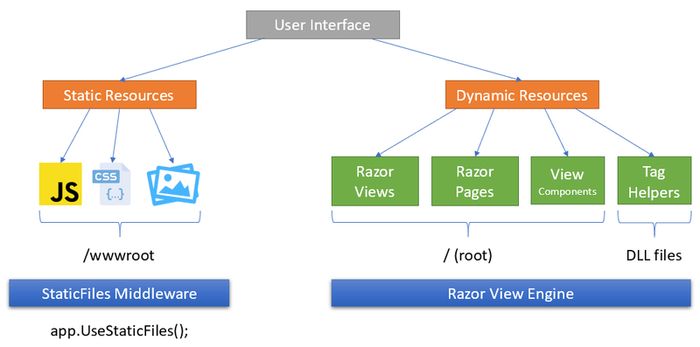
Static resources include JavaScript, CSS, Image… files. These resources are requested by browser and responded by the Static Files middleware. They are generally located under wwwroot folder of the application.
Dynamic resources are Razor views, pages and components. They are handled, compiled and rendered by the Razor View Engine.
Both static and dynamic files are normally located in the physical file system (while the latest ASP.NET Core has a pre-compile option, the main point is same).
User Interface Components in a Modular Application
In a modular application, UI components are distributed into modules and generally embedded into module assemblies (DLL files).
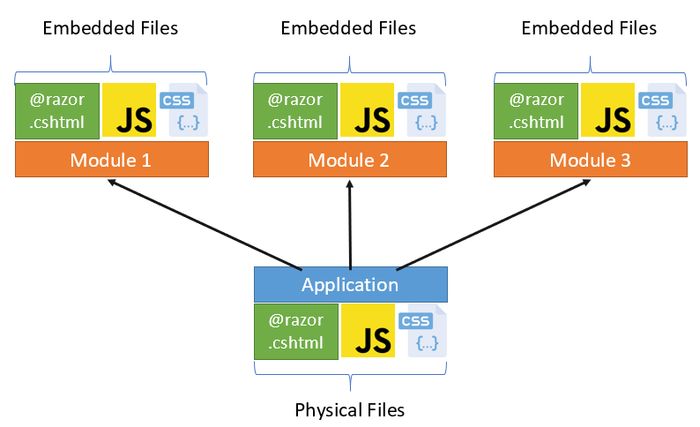 The Static File Middleware and the Razor View Engine can not work with the resources distributed across module assemblies.



Comments
No one has commented yet, be the first to comment!